

There’s a moment every product team knows too well — when everything feels ready, but communication holds you back.
A feature ships, a milestone goes live, yet customers barely notice. Teams celebrate in silence, and your momentum disappears into the noise.
If you’ve felt this gap — the frustrating space between doing great work and making sure people actually see it — you’re not alone.
In this LaunchNotes review, we’re breaking down what the platform really does, how it works, and whether it’s the communication tool product-led teams genuinely need in 2025. By the end, you’ll know whether LaunchNotes can transform the way you share updates, align teams, and build trust through transparency.
What Is LaunchNotes?
Overview of the Platform

LaunchNotes is a product communication platform built to help teams share updates with clarity, consistency, and confidence. In simple terms, it centralizes all your product updates — from small fixes to major releases — into a branded, easy-to-follow hub.
It’s designed for:
- SaaS companies
- Product managers
- Customer success teams
- Marketers
- Engineering teams
- Growth and PLG teams
Anyone involved in the product development lifecycle benefits from LaunchNotes’ structured way of delivering release notes, managing changelogs, and maintaining a public or private roadmap.
How LaunchNotes Works
At its core, LaunchNotes turns scattered release communication into a clean, organized system. It does this through:
Product Updates Hub
A single place for customers and internal teams to follow everything happening in your product — neatly timestamped, categorized, and styled.
Changelog System
Your changelog becomes more than a list of technical notes. It becomes a narrative your audience can understand.
Release Notes Automation
Write once → distribute everywhere.
LaunchNotes helps create, format, and publish your release notes with less effort.
Customer Segmentation
You can send updates only to the users who truly need them. Segment by plan, role, interests, product areas, behaviors, and more.
“Good communication doesn’t just inform — it invites people deeper into your product story.”
Key Features of LaunchNotes
Centralized Product Updates Hub
This is the heartbeat of LaunchNotes. Rather than updates scattered across emails, Slack messages, and internal docs, everything lives in one organized space.
Benefits include:
- Real-time customer updates
- A unified communication source for internal teams
- Smooth developer → marketing → customer workflows
- Clear product momentum visibility
It’s not just a hub — it’s a commitment to transparency.
Customizable Changelogs & Release Notes
LaunchNotes makes traditionally technical information readable and elegant with:
Templates
Consistent formatting with customizable templates.
Versioning Tools
Keep every update tracked and traceable.
Public vs Private Changelogs
Share everything or keep sensitive updates behind authentication. Perfect for Enterprise communication, B2B2C use cases, or multi-team environments.
User Segmentation & Targeted Messaging
This is where LaunchNotes stands out.
Instead of blasting every update to everyone, you can:
- Personalize notifications
- Target by behavior, plan, or interest
- Reduce noise
- Improve feature adoption
- Build a tighter feedback loop
It feels less like “marketing blasts” and more like thoughtful communication.
Roadmapping Tools
LaunchNotes also includes product roadmap features perfect for teams that want visibility without complexity:
- Internal roadmaps for leadership and stakeholders
- External roadmaps for customers and community
- Prioritization frameworks
- Clear stage-based product status
A roadmap becomes a living, breathing communication tool — not a static chart.
Integrations & Workflow Automation
LaunchNotes connects with tools most teams already use:
- Slack
- Jira
- GitHub
- Email platforms
- Webhooks
- API integrations
Together, these automate your release workflow and reduce manual communication.
Subscriptions & Notification Preferences
Users can choose how they want to stay updated:
- Email alerts
- RSS feeds
- In-app notifications
- Web push (if configured)
People subscribe to what matters — and the noise fades naturally.
LaunchNotes User Experience and Interface
Ease of Use
The LaunchNotes UI has a clean, modern feel. Most actions take one or two clicks. The onboarding flow is beginner-friendly, walking you through:
- Setting up your updates page
- Connecting integrations
- Creating your first announcement
- Organizing categories
- Customizing branding
Customization is simple but powerful — fonts, colors, logo, layout, and even update categories can be deeply tailored.
Team Collaboration Experience
LaunchNotes shines when multiple teams are involved:
- Developers can push updates directly from their workflows.
- Product managers gain a consistent release communication flow.
- Marketers can add storytelling and formatting layers.
- Customer-facing teams stay aligned without chasing documents.
It becomes a team alignment tool, removing friction and guesswork.
LaunchNotes Pricing Explained
Pricing Tiers Overview
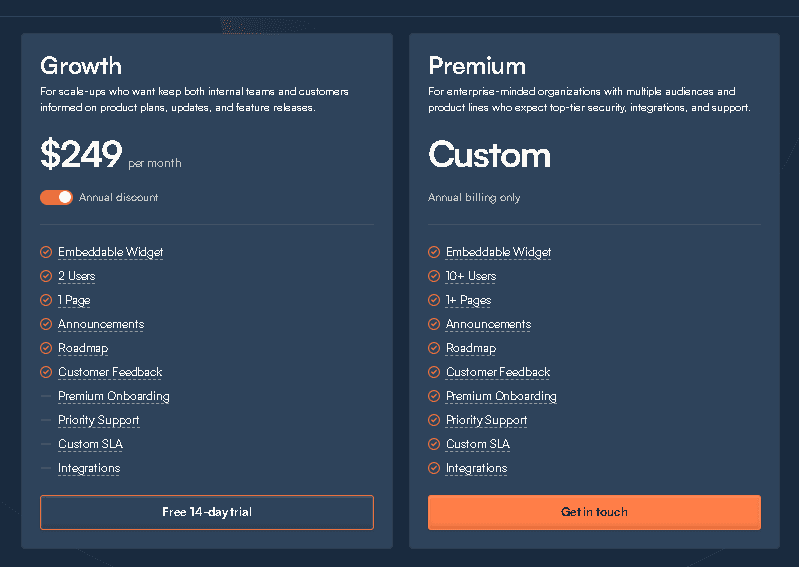
LaunchNotes offers multiple plans depending on team size and requirements:
Free Plan
(If available at the time of reading) — typically limited, good for early exploration.
Pro Plan
Designed for growing SaaS teams that want automated release notes, segmentation, and public updates.
Enterprise Plan
Includes advanced segmentation, security layers, enhanced access control, private updates, and deeper automation options.
Value for Money
LaunchNotes is not the cheapest tool — but the value comes from time saved and clarity gained.
Who benefits most?
- Teams with consistent releases
- PLG companies
- Enterprise teams with multi-stakeholder communication
- Product managers juggling changelogs plus roadmaps plus updates
If you ship often, LaunchNotes’ automation alone can be worth the investment.
LaunchNotes Review: Pros and Cons
Pros
- Modern, sleek, intuitive UI
- Excellent for product-led growth teams
- Strong automation across Jira + GitHub
- Beautiful changelog and release note templates
- Segmentation that boosts engagement
- Public/Private update pages
- Cuts down on internal communication chaos
- Great for customer trust and transparency
Cons
- Pricing may be high for small or early-stage startups
- Enterprise-level features locked behind higher plans
- Learning curve for complex segmentation
- Requires team alignment to reach full value
“Tools don’t transform teams — clarity does. LaunchNotes simply makes clarity easier.”
Who Should Use LaunchNotes?
Best For
LaunchNotes is ideal for:
- SaaS companies with ongoing product updates
- Tech startups focusing on product-led growth
- Mature product teams
- Enterprise organizations needing structured communication
- Product managers and customer success teams
- Businesses improving their product momentum communication
If your releases matter, LaunchNotes gives them a voice.
Not Ideal For
Launch Notes may not be perfect for:
- Early-stage startups with minimal releases
- Small teams with low update frequency
- Companies looking for a free solution
- Teams using tools like Notion or Trello as basic changelogs
If you only ship updates occasionally, simpler tools may be enough.
LaunchNotes Alternatives
Top Competitors
Here are the closest competitors to Launch Notes:
- Beamer — Strong for announcements and in-app updates
- HeadwayApp — Simple changelog and update feed
- Productboard — More of a product management suite
- Trello — Good for basic roadmapping but limited for communication
Feature Comparison Overview
LaunchNotes vs Beamer
– LaunchNotes is stronger for roadmaps and segmentation.
– Beamer is better for quick announcements.
LaunchNotes vs HeadwayApp
– HeadwayApp is simpler and cheaper.
– Launch Notes offers more customization and workflow automation.
LaunchNotes vs Productboard
– Productboard is powerful for prioritization.
– Launch Notes excels at communication, updates, and storytelling.
LaunchNotes Use Cases
For Product Updates
Perfect for:
- Monthly release summaries
- Feature announcements
- Bug fix batches
- Product momentum timelines
Updates become part of your brand’s narrative.
For Customer Communication
Launch Notes improves:
- Transparency
- Trust
- Feature adoption
- Customer experience
Users never feel left in the dark.
For Internal Alignment
Helps connect:
- Developers
- Product managers
- Sales
- Support
- Executives
Everyone sees the same, unified product story.
Final Verdict — Is LaunchNotes Worth It in 2025?
Launch Notes is more than a release notes software — it’s a communication layer for modern product teams. If your company ships updates regularly and values transparency, clarity, and alignment, the platform is absolutely worth the investment. But if you’re a small, early-stage team with minimal updates, you may not fully benefit from everything LaunchNotes offers.
Still, for most SaaS teams, LaunchNotes becomes the place where customer insights meet product momentum — and where every update feels like it finally gets the attention it deserves.
Conclusion
LaunchNotes brings order to the chaos of product updates. It helps teams communicate with purpose, share progress with confidence, and build trust through transparency. If your product evolves quickly and you want your users to feel connected to that journey, Launch Notes is a tool that can quietly transform how your team works together. In a world full of noise, it helps you speak clearly — and that alone can change everything.
FAQ
1. What is Launch Notes used for?
Launch Notes is a product communication tool used for sharing release notes, tracking updates, publishing roadmaps, and aligning internal and external stakeholders.
2. Does Launch Notes have a free plan?
Availability varies, but Launch Notes occasionally offers a limited free plan for small teams exploring its core features.
3. Is Launch Notes good for product-led growth (PLG) companies?
Yes. Its segmentation, automation, and update pages make it ideal for PLG teams that frequently ship features and need to improve customer awareness.
4. Can Launch Notes replace a roadmap tool like Trello or Notion?
For simple roadmaps, yes. For complex prioritization workflows, a product management suite like Productboard may still be needed.
5. Does Launch Notes integrate with developer tools?
Absolutely. It integrates with Slack, GitHub, Jira, email tools, and other systems that support automated release workflows.