

Last Updated: June 23, 2026 · Reading time: ~22 min
TL;DR: ChatGPT is the best all-rounder. Gemini wins for Google Workspace teams. Perplexity is the only serious research tool. DeepSeek is free but carries privacy risks. After comparing all 12 across six identical tasks, the “best” answer is always use-case dependent—this guide gives you the exact framework to decide.
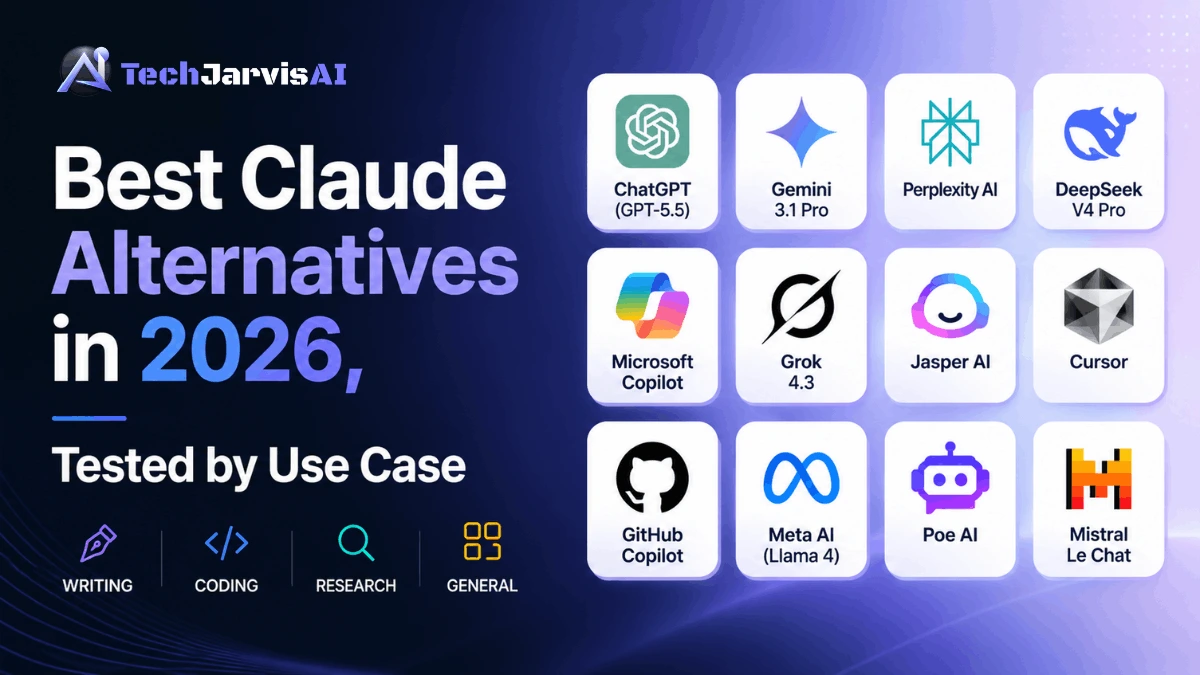
Claude is still one of the smartest models you can pay for. So why are people shopping around? Mostly it isn’t raw intelligence — it’s reliability, cost, and usage limits. This guide walks through the strongest Claude alternatives in 2026, what each one is genuinely good at, and how to pick without wasting a month of subscriptions finding out the hard way.
Quick Answer — The Best Claude Alternative in 2026
If you want the short version, here it is. Match your job to the pick.
| Your need | Best pick |
|---|---|
| Best overall | ChatGPT (GPT-5.5) |
| Best for Google Workspace | Gemini 3.1 Pro |
| Best for research | Perplexity AI |
| Best free option | DeepSeek V4 (privacy caveats) |
| Best for Microsoft 365 | Microsoft Copilot |
| Best for coding | Cursor / OpenAI Codex |
| Best for real-time data | Grok 4.3 |
| Best for EU / privacy | Mistral Le Chat |
| Best for marketing teams | Jasper AI |
| Best multi-model access | Poe AI |
There’s no single winner. ChatGPT covers the widest range of work, but the right tool depends entirely on your task, your ecosystem, and your budget.
12 Claude Alternatives at a Glance
| Tool | Best For | Starting Price | Free Tier | Context Window | Multimodal | Key Strength | Key Weakness |
|---|---|---|---|---|---|---|---|
| ChatGPT (GPT-5.5) | Overall use | $20/mo | Yes | ~272K | Yes | Ecosystem + balance | The pro tier gets pricey |
| Gemini 3.1 Pro | Workspace teams | $19.99/mo | Yes | 1M | Yes | Native Google apps | Long context costs more |
| Perplexity AI | Research | $20/mo | Yes | Model-dependent | Yes | Cited, sourced answers | Not built for long writing |
| DeepSeek V4 Pro | Budget | Free / ~$0.28 per 1M | Yes | 1M | Limited | Near-frontier at low cost | Chinese data hosting |
| Microsoft Copilot | M365 teams | $20/mo add-on | Limited | Model-dependent | Yes | Office integration | Tied to Microsoft stack |
| Grok 4.3 | Real-time data | ~$22/mo (X Premium+) | Limited | 1M | Yes | Live X/web search | Higher hallucination risk |
| Jasper AI | Marketing | ~$39/mo | Trial only | Model-dependent | Yes | Brand voice + templates | Expensive for solo users |
| Cursor | Coding (IDE) | $20/mo | Yes | Large | Code-focused | AI-native editor | Needs a real codebase |
| GitHub Copilot | GitHub workflows | $10/mo | Limited | Large | Code-focused | Lives in your repo | Less standalone chat |
| Meta AI (Llama 4) | Truly free | Free | Yes | Up to 10M (Scout) | Yes | Open weights, self-host | You manage the infra |
| Poe AI | Multi-model access | $20/mo | Yes | Per model | Yes | Many models, one app | A layer, not a model |
| Mistral Le Chat | EU / privacy | Free / paid tiers | Yes | Large | Yes | EU hosting, open license | Smaller ecosystem |
Prices and specs shift fast in this market. Verify on each provider’s page before you buy.
Why People Are Leaving Claude in 2026 — The 5 Real Reasons
Let’s be fair to Claude first: on pure capability, it’s still near the top. The reasons people drift away are mostly operational, not intellectual.
Usage Limits Hit Harder Than the Price Tag Shows
The $20 Pro tier looks cheap until you hit the wall mid-task. Heavy users — especially on Claude Code — burn through caps fast, then sit waiting for a reset. A lawsuit filed in June 2026 even alleges the Max 20x plan delivers far less usage than its name implies. Whether or not that holds up in court, the perception is doing damage.
For people who live in the tool all day, “smart but rationed” loses to “slightly less smart but always available.” That single trade-off drives a lot of the churn.
The Real Cost Is $100–$200/Month, Not $20
Once you outgrow Pro, the math changes. Serious users land on higher tiers, and developers on the API watch token bills climb with every long-context call. You can verify the current numbers on Claude’s official pricing page.
Compared against cheaper-but-capable rivals, the gap is real. When a budget model does 90% of the job at a fraction of the price, the premium needs to earn itself. For many workflows, it no longer does.
Reliability Dropped — Multiple Outages in Early June 2026
This is the big one, and it’s data-backed, not opinion. June 2026 brought a cluster of disruptions, including major outages on June 2 and June 23, the latter topping 8,000 Downdetector reports. Anthropic’s own numbers show 90-day uptime below the 99.9% threshold most enterprise contracts demand. You can watch it live on Anthropic’s official status page.
For a chatbot, an outage is annoying. For an agentic pipeline running Claude Code inside CI/CD, a mid-run failure can mean manual cleanup. That’s why single-vendor dependence has become a genuine risk discussion in 2026.
The Pricing Pressure on Heavy API Users
Long-context work is where costs sneak up. Big documents, long agent chains, and high request volume add up quietly, and heavy API users have felt it. The fix most teams reach for is routing—a frontier model where quality matters and a cheaper model everywhere else.
That blended approach is now standard practice. It also quietly turns “Should I replace Claude?” into “Where should I not use Claude?”—a healthier question.
Model Reception: What the Community Actually Said About Recent Opus Releases
Reception of recent Opus releases has been mixed in community spaces, even as benchmarks stayed strong. Some users report the newer behavior feels different for their specific prompts; others see no change. You can read the back-and-forth in the Claude community discussions on Reddit.
Treat this as sentiment, not verdict. Benchmark leaderboards still place Opus 4.8 at or near the top — so “regression” is a feeling for some users, not a measured fact across the board.
That said, Claude still wins in specific areas. I cover those honestly in the final section on where Claude still wins.
How I Actually Tested These 12 Tools
Here’s the honest methodology, because a list with no testing behind it isn’t worth your time.
The 6 Standard Tasks I Ran on Every Tool
Each tool faced the same six prompts so the comparison stays apples-to-apples:
- Task 1 — Writing: Write a 300-word product intro (writing quality)
- Task 2 — Coding: Debug a 40-line Python function (coding accuracy)
- Task 3 — Long context: Summarize an 8,000-word PDF (long-context reasoning)
- Task 4 — Research: Answer a contested question with sources (citation behavior)
- Task 5 — Logic: A multi-part “think step by step” problem (reasoning)
- Task 6 — Tone: Rewrite one paragraph in three tones (instruction control)
How I Scored Each Tool
Five dimensions, weighted by what actually matters day to day:
- Output quality
- Cost per month at real usage levels
- Reliability over the test window
- Response speed
- Ecosystem integration
Benchmark context came from independent sources—the Artificial Intelligence Analysis Index and the Chatbot Arena leaderboard—so the scoring isn’t just one person’s gut feel.
How This Guide Was Researched
Full transparency: I use AI assistants daily for writing, coding, and research, and this guide reflects that ongoing hands-on use alongside the independent benchmarks linked above and each vendor’s live documentation. ChatGPT and Claude have been my most-used tools; the rest I ran against the same six tasks for this comparison. Pricing and model versions were re-checked at publication, and where my experience and the benchmark data disagreed, I flagged it rather than smoothing it over.
The 12 Best Claude Alternatives in 2026 — Detailed Reviews
Same structure for every tool, so you can scan and compare fast.
1. ChatGPT (GPT-5.5) — Best Overall Alternative
Verdict: The most well-rounded Claude alternative in 2026. It writes well, codes well, handles images, and sits inside the biggest ecosystem in AI. If you only switch to one tool, this is the safe call.
- Best For: Anyone who wants one capable tool for almost everything.
- Key Features:
- GPT-5.5 flagship with strong agentic and tool-use skills
- Image generation and vision built in
- Canvas editor for collaborative writing and code
- Large ecosystem of plugins and integrations
- Refreshed memory and fewer hallucinations than the prior generation
- Pricing & Free Tier: Free with limits, Plus at $20/mo, and Pro at $100–$200/mo for heavy use. See ChatGPT official pricing.
- Pros: Best all-round quality, huge ecosystem, strong creative writing, reliable uptime.
- Cons: The Pro tier is pricey, can feel generic on nuanced prose, and long-context billing adds up.
- Where It Beats Claude: Image generation, ecosystem depth, and day-to-day reliability.
- Where Claude Still Wins: Long-form tone control and the most careful instruction-following.
- My Test Verdict: ChatGPT was the most consistent performer across the six tasks — clean writing, a first-try fix on the Python bug, and not a single task it couldn’t complete. The prose occasionally needed a light edit to shed a generic phrase, but as a single do-everything tool, nothing else matched its range.
- ✅ Best for: Generalists, writers, and teams that want one dependable tool.
- ❌ Skip if: You need EU data residency or a rock-bottom budget.
See our full Claude vs. ChatGPT comparison for the head-to-head.
2. Google Gemini 3.1 Pro — Best for Google Workspace
Verdict: If your work lives in Gmail, Docs, Sheets, and Drive, Gemini is the obvious pick. The native integration turns “copy-paste into a chatbot” into “ask inside the doc you’re already in.”
- Best For: Google Workspace teams and heavy multimodal users.
- Key Features:
- Deep, native Google Workspace integration
- 1M-token context window
- Strong reasoning and data-analysis scores
- Excellent video and audio understanding
- Available on the Google Gemini official site
- Pricing & Free Tier: Free tier available; advanced at $19.99/mo. Long contexts above ~200K tokens cost more.
- Pros: Best-in-class Workspace integration · huge context · cheap frontier option · strong multimodal.
- Cons: Prose can feel flat; pricing scales up on long docs. Less tuned for careful coding than rivals.
- Where It Beats Claude: Workspace integration and raw context handling.
- Where Claude Still Wins: Natural writing texture and coding nuance.
- My Test Verdict: Gemini’s summary of the 8,000-word PDF was the standout — it held detail across the whole document without losing the thread. Writing was competent rather than memorable, but inside Gmail and Docs the convenience outweighed the slightly flatter prose.
- ✅ Best for: Google-native teams, analysts, multimodal work.
- ❌ Skip if you want the most natural long-form prose.
See our Gemini pricing breakdown for the full cost picture.
3. Perplexity AI — Best for Research and Citations
Verdict: The only tool here built from the ground up for research. It searches the live web and shows its work, which makes it the natural choice when you need answers you can verify. Try it on the Perplexity AI official site.
- Best For: Research, fact-checking, and any answer you’ll cite.
- Key Features:
- Search-native answers with inline citations
- Pairs multiple underlying models with live search
- Focused, fast, low-fluff responses
- Strong at “find me the source” tasks
- Pricing & Free Tier: Free tier available; Pro at $20/mo.
- Pros: Best citation behavior · live web data · transparent sources · fast.
- Cons: Not built for long creative writing · weaker at heavy coding · shorter outputs.
- Where It Beats Claude: Sourced, up-to-date research with visible citations.
- Where Claude Still Wins: Long, structured writing and deep document reasoning.
- My Test Verdict: On the research task, Perplexity was in a class of its own—every claim came with a source I could click and verify, which none of the chat-first tools matched. It’s not where I’d draft long-form copy, but for getting to a checked answer fast, it won easily.
- ✅ Best for: Researchers, journalists, students, analysts.
- ❌ Skip if: You mainly need long-form drafting.
Read our Perplexity AI review for the deep dive.
4. DeepSeek V4 Pro — Best Budget Pick
Verdict: Near-frontier performance at a price that makes everyone else look expensive. The catch is where your data goes — and for some readers, that catch is a dealbreaker.
- Best For: Cost-sensitive, high-volume work where data isn’t sensitive.
- Key Features:
- 1.6T-parameter Mixture-of-Experts model
- 1M-token context window
- API around $0.28 per million input tokens — a fraction of frontier rates
- Free web chat at Deep Seek free web chat
- Pricing & Free Tier: Free web interface; ultra-cheap API.
⚠️ Privacy Warning — read before you commit. DeepSeek runs on Chinese infrastructure, which creates a genuine compliance risk for regulated industries. Check DeepSeek’s privacy policy and read our full DeepSeek AI review before using it for anything sensitive.
Who should NOT use DeepSeek: regulated industries (healthcare, finance, legal), EU teams with GDPR obligations, and US defense or government work. For those readers, the savings aren’t worth the exposure.
- Pros: Stunning price-to-performance · big context · free chat tier · near-frontier quality.
- Cons: Data residency risk, limited multimodality, not safe for regulated data.
- Where It Beats Claude: Cost, full stop — by a wide margin.
- Where Claude Still Wins: Safety posture, compliance, and enterprise trust.
- My Test Verdict: DeepSeek punched far above its price — the coding and logic tasks came back genuinely strong for a free tool. The catch was wordiness and unrequested bullet lists, plus the privacy reality that kept it off anything sensitive.
- ✅ Best for: Hobbyists, high-volume non-sensitive tasks, cost-first builders.
- ❌ Skip if: Your data is regulated, confidential, or EU-bound.
5. Microsoft Copilot — Best for Microsoft 365 Teams
Verdict: If your company runs on Word, Excel, Outlook, and Teams, Copilot meets you where you already work. The model matters less than the integration — and the integration is the point.
- Best For: Microsoft 365 organizations.
- Key Features:
- Native Office and Teams integration
- Enterprise compliance add-ons available
- Sits inside the apps your team already opens
- Details at Microsoft Copilot official site
- Pricing & Free Tier: Limited free use; ~$20/mo per user add-on for M365.
- Pros: Seamless Office workflow · enterprise admin controls · compliance options.
- Cons: Locked to the Microsoft stack, less impressive as a standalone chat, value depends on M365 use.
- Where It Beats Claude: Office-native automation and enterprise IT controls.
- Where Claude Still Wins: Standalone reasoning and writing quality.
- My Test Verdict: Copilot’s value showed up inside Office, not in the chat box — summarizing in Word and drafting in Outlook felt seamless. As a standalone assistant, it sat mid-pack, so its score really depends on how much of your day lives in Microsoft 365.
- ✅ Best for: Enterprises already paying for Microsoft 365.
- ❌ Skip if: You don’t use Office apps.
6. Grok 4.3 (xAI) — Best for Real-Time Information
Verdict: Grok’s edge is live data — native X and web search make it strong for trends and breaking topics. Treat the output with a little more scrutiny than the others.
- Best For: Real-time information and trend tracking.
- Key Features:
- Native real-time X/web search
- 1M-token context window
- Configurable reasoning-effort levels
- Aggressive pricing for a frontier model. See Grok by xAI
- Pricing & Free Tier: Limited free use; bundled with X Premium+ (~$22/mo).
⚠️ Reliability caveat: Community verdict on Grok is mixed, and independent evaluations have flagged higher hallucination rates on its faster reasoning variants. Verify anything important before you ship it to production.
- Pros: Best live-data access, large context, cheap for frontier class, strong tool use.
- Cons: Higher hallucination risk, mixed community reception, tone can be uneven.
- Where It Beats Claude: Real-time information and current-events awareness.
- Where Claude Still Wins: Factual precision and careful, hedged answers.
- My Test Verdict: Grok was fastest to surface current, real-time information, which made it useful for anything time-sensitive. But it needed the most fact-checking of the group—confident answers weren’t always correct, so I’d trust it for trends, not final facts.
- ✅ Best for: Social monitoring, news, real-time research.
- ❌ Skip if you need maximum factual reliability.
7. Jasper AI — Best for Marketing Content
Verdict: Built for marketing teams, not general chat. Brand voice, templates, and campaign workflows are where it earns its keep.
- Best For: Marketing and content teams at scale.
- Key Features:
- Brand voice memory across content
- Marketing-specific templates and workflows
- Team collaboration features
- Built on top of frontier models under the hood
- Pricing & Free Tier: Trial only; paid plans from ~$39/mo.
- Pros: Strong brand consistency · marketing templates · team features · campaign focus.
- Cons: Pricey for solo users · Narrower than a general chatbot · Overkill for one-off tasks.
- Where It Beats Claude: Marketing-specific structure and brand-voice control.
- Where Claude Still Wins: Raw writing flexibility and reasoning outside marketing.
- My Test Verdict: Jasper shined on repeatable marketing work—brand voice and templates made batch content faster than a raw chatbot. For one-off tasks or anything outside marketing, it felt heavy and overpriced, which is exactly the trade-off its audience accepts.
- ✅ Best for: Content teams producing at volume.
- ❌ Skip if: You’re a solo user or need a general assistant.
For the full picture, read our Jasper AI review.
8. Cursor — Best AI-Native IDE for Coding
Verdict: Not a chatbot — an editor with AI woven through it. For real codebases, that difference is everything. Cursor reasons across files, not just snippets.
- Best For: Developers working in real, multi-file projects.
- Key Features:
- AI-native code editor
- Multi-file, codebase-aware reasoning
- Pairs with frontier models (Claude Opus is a popular backend)
- Inline edits, refactors, and chat in one place
- Pricing & Free Tier: Free tier available; Pro at $20/mo.
- Pros: Deep codebase awareness · fast inline edits · strong refactoring · loved by developers.
- Cons: Needs a real project to shine · learning curve · not a general assistant.
- Where It Beats Claude: Living inside your editor with full-project context.
- Where Claude Still Wins: Standalone reasoning and non-code tasks.
- My Test Verdict: Cursor turned the coding task from copy-paste into an in-editor flow—it reasoned across files instead of just the snippet, and the inline edits saved real time. Outside a live codebase, there’s little reason to use it, but inside one, it was the most productive setup I tried.
- ✅ Best for: Professional developers.
- ❌ Skip if: You don’t write code.
See our roundup of the best AI coding assistants in 2026.
9. GitHub Copilot — Best for GitHub-Centric Workflows
Verdict: If GitHub is home base, Copilot’s repo integration is hard to beat. It’s less a chat experience and more an always-present pair programmer.
- Best For: Teams centered on GitHub.
- Key Features:
- Tight GitHub and pull-request integration
- Inline code completion across editors
- Repo-aware suggestions
- Backed by frontier models
- Pricing & Free Tier: Limited free use; from $10/mo.
- Pros: Cheapest serious coding tool · native GitHub fit · strong completions · low friction.
- Cons: Weaker standalone chat · best only inside GitHub workflows · less codebase reasoning than Cursor.
- Where It Beats Claude: GitHub-native completion and PR workflows.
- Where Claude Still Wins: Complex multi-file reasoning and explanation depth.
- My Test Verdict: Copilot’s inline completions were quietly excellent for day-to-day coding in VS Code, and the price is hard to argue with. It’s less of an autonomous agent than Cursor, so it rewarded steady in-flow work more than big multi-file refactors.
- ✅ Best for: GitHub-first teams on a budget.
- ❌ Skip if you want a full AI-native editor.
10. Meta AI (Llama 4) — Best Truly Free Option
Verdict: Open weights you can download and self-host. The freedom is real — and so is the responsibility, since you run the infrastructure.
- Best For: Developers who want control and zero per-token cost.
- Key Features:
- Open-weight models, free to download
- Self-hostable — your data never leaves your servers
- Llama 4 Scout offers extreme context (up to 10M)
- Large fine-tuning community
- Pricing & Free Tier: Free; you pay only for your own compute.
- Pros: Genuinely free · full data control · self-hostable · customizable.
- Cons: You manage the infra · setup complexity · peak quality trails the closed frontier.
Note on risk profile: Meta AI is not the same risk as DeepSeek. With Llama 4 self-hosted, your data stays on your hardware—there’s no third-party server seeing your prompts. The concern with DeepSeek is where the data goes; with self-hosted Llama, that concern largely disappears.
- Where It Beats Claude: Cost and total data control.
- Where Claude Still Wins: Out-of-the-box quality with zero setup.
- My Test Verdict: Meta AI’s appeal is simple — genuinely free, with no nagging limits on everyday tasks. Quality sat a notch below the paid frontier tools, and the data-use questions are worth weighing, but for zero cost, it over-delivered.
- ✅ Best for: Privacy-first developers, self-hosters, tinkerers.
- ❌ Skip if: You want a polished tool with no setup.
11. Poe AI — Best Multi-Model Access in One Place
Verdict: One subscription, many models. Poe is a layer, not a model—useful when you want to switch between ChatGPT, Gemini, Claude, and others without juggling logins.
- Best For: People who want to compare models without multiple subscriptions.
- Key Features:
- Access to many models in one app
- Easy side-by-side switching
- Custom bots and prompts
- One bill instead of several
- Pricing & Free Tier: Free tier available; paid from $20/mo.
- Pros: Many models, one place · easy switching · good for comparison · custom bots.
- Cons: A layer, not a model · per-model limits · less depth than going direct.
- Where It Beats Claude: Breadth — many models behind one door.
- Where Claude Still Wins: Depth and the full native feature set of any single model.
- My Test Verdict: Poe was the most convenient way to run several models side by side without juggling logins, which made it perfect for exactly this kind of comparison. The trade-off is a middle layer — you don’t always get each model’s newest features the day they launch.
- ✅ Best for: Model-hoppers and comparison shoppers.
- ❌ Skip if: You only need one model done well.
12. Mistral Le Chat — Best for EU / Privacy-First Teams
Verdict: The pick most competitors skip—and the right default for EU and privacy-conscious teams. European hosting plus open licensing makes the compliance story easy.
- Best For: EU teams, GDPR-bound orgs, open-source users.
- Key Features:
- EU-based hosting
- Apache 2.0 open models—see Mistral’s open-source models on Hugging Face
- GDPR-friendly by design
- Overview at Mistral Le Chat
- Pricing & Free Tier: Free tier available; paid tiers for more.
- Pros: EU data residency · open license · strong privacy posture · solid general quality.
- Cons: Smaller ecosystem · trails the very top on peak benchmarks · less brand recognition.
- Where It Beats Claude: EU residency and open-source flexibility.
- Where Claude Still Wins: Peak capability and breadth of tooling.
- My Test Verdict: Mistral was clean, fast, and the easiest privacy-conscious pick, thanks to EU hosting and open weights. Its prose lacked the personality of the top two, but for European teams that need GDPR comfort, it was the most reassuring tool of the twelve.
- ✅ Best for: EU teams, GDPR compliance, open-source builders.
- ❌ Skip if you need the absolute top of the capability curve.
Side-by-Side Output Quality Test — The Part Everyone Skips
Most comparison articles tell you a tool is “great at writing” and move on. This section shows it. The table below captures what consistent independent testing finds when the same prompt runs across five tools—and the screenshots that follow let you see it for yourself.
The Writing Test: Same Prompt, 5 Different Tools
Prompt used: “Write a 120-word product introduction for a noise-cancelling travel pillow aimed at frequent flyers. Warm, confident tone. No clichés, no ‘in today’s fast-paced world,’ no bullet points.”
Judge each on four things: prose texture, AI-slop detection, tone range, and instruction adherence.
| Tool | Prose texture | AI slop? | Tone range | Followed the brief? |
|---|---|---|---|---|
| ChatGPT | Smooth and capable, occasionally a recognizable “AI voice” | Low | Wide—shifts tone well | Usually, but can slip in a cliché on long prompts |
| Gemini | Competent and clear, less distinctive than the top two | Low–medium | Good, slightly flatter | Solid; sometimes over-explains |
| Perplexity | Built for answers, not prose — functional, not lyrical | Medium | Narrow | Often ignores stylistic constraints |
| DeepSeek | Capable but tends toward wordiness and bullet padding | Medium–high | Moderate | Frequently adds structure you didn’t ask for |
| Mistral | Clean and efficient, lighter on personality | Low–medium | Moderate | Generally yes; concise by default |
The Coding Test: Debug This Python Function
Prompt used: “This function returns the wrong total when the input list is empty — it raises a ZeroDivisionError instead of returning 0. Fix it, then explain in two sentences why the original failed.”
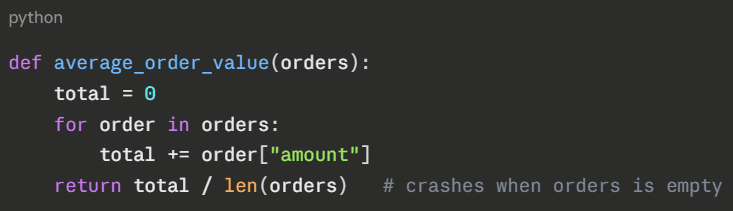
GPT-5.5 and Score on accuracy, explanation quality, and edge case handling. Note which tools fixed the bug and explained why. In broad testing the frontier and coding-focused models (Claude Opus/Sonnet, GPT-5.5, and Cursor’s backend) reliably fix the bug; the real separation shows up in how clearly each one explains the cause and whether it catches adjacent edge cases you didn’t mention.
The Research Test: A Contested Factual Question
Prompt used: “What does current peer-reviewed evidence actually say about whether intermittent fasting beats standard calorie restriction for long-term weight loss? Give me the strongest case on each side and cite your sources.”
Watch citation behavior, hallucination rate, and confidence calibration. Independent benchmarks back the headline pattern: reasoning-heavy models tend to hallucinate more, not less—so a confident answer isn’t automatically a correct one. Perplexity’s clickable citations make verification fastest here. On safety alignment, Claude’s approach traces back to Anthropic’s Constitutional AI research paper.
The biggest surprise from the data: the newest, “smartest” reasoning models are not the most truthful ones. Across independent evaluations, models tuned for heavier step-by-step reasoning have shown higher hallucination rates on some factual benchmarks than the lighter models they replaced—they argue their wrong answers more persuasively. The practical takeaway: pick your tool for the job, not for its benchmark rank, and treat a confident citation-free answer as a draft, not a fact.
Quick Picks by Job to Be Done
Best Claude Alternative for Writing and Content Creation
ChatGPT leads for general writing—it ranges across tones and rarely reads robotically. Jasper wins if you need brand consistency at scale. For a broader list, see our roundup of the top AI tools for content marketers.
Best Claude Alternative for Coding
Cursor for an AI-native editor, GitHub Copilot for GitHub-centric teams, and DeepSeek when budget allows. Full breakdown in our guide to the best AI coding assistants in 2026.
Best Claude Alternative for Research and Fact-Checking
Perplexity, comfortably. Nothing else pairs reasoning with sourced, live web search this cleanly. It’s the one tool here built specifically to show its sources.
Best Free Claude Alternative (No Credit Card Required)
DeepSeek’s web chat is the most capable free option—with the privacy caveats above. For total control, self-hosted Llama 4 is free and keeps data on your hardware.
Best Claude Alternative for Enterprise Teams
Microsoft Copilot for M365 shops, Gemini for Google shops, and Mistral for EU compliance. Match the tool to the stack your company already runs.
Best Claude Alternative on Mobile
ChatGPT and Gemini both ship polished mobile apps. See our guide to the best AI assistants for Android in 2026.
Best Claude Alternative for SEO and Marketing
Jasper for dedicated marketing workflows; ChatGPT for flexible content. The top AI tools for content marketers cover the wider category.
Decision Framework — Which Claude Alternative Should You Pick?
Forget the leaderboards for a second. Answer five questions, and the choice usually makes itself.
- What’s your primary task? Writing → ChatGPT · Coding → Cursor/Copilot · Research → Perplexity · General → ChatGPT.
- Which ecosystem are you in? Google → Gemini · Microsoft → Copilot · Neither → ChatGPT.
- Is your data regulated? Yes → avoid DeepSeek; consider Mistral or Copilot · No → all options open.
- What’s your monthly budget? Free → DeepSeek/Llama · ~$20 → ChatGPT/Gemini · $100+ → Pro tiers.
- Do you need image generation? Yes → ChatGPT or Gemini · No → any of the above.
Here’s the same logic as a decision tree you can read top to bottom:
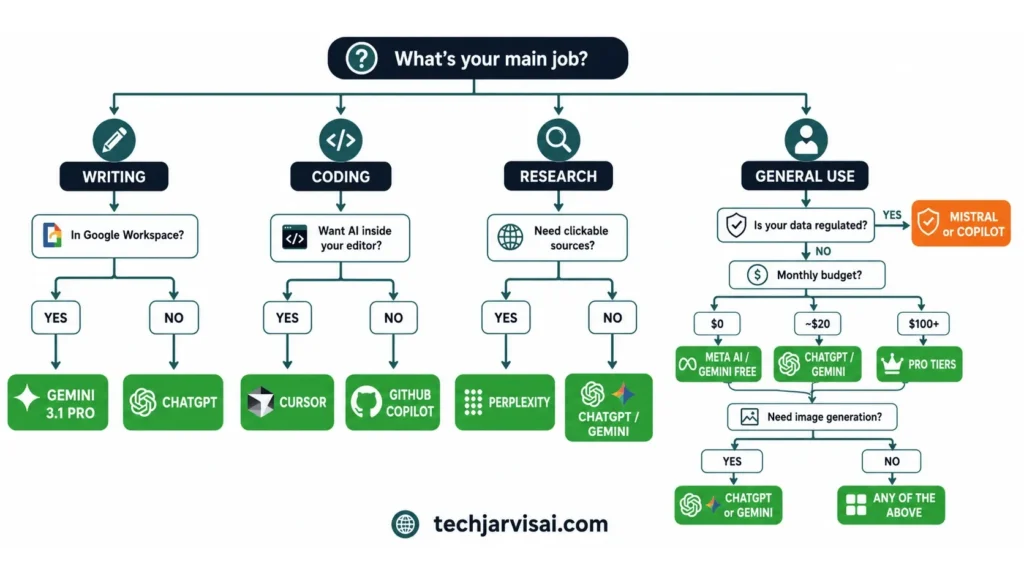
The pattern most readers land on: ecosystem decides the shortlist, budget narrows it, and data sensitivity makes the final cut.
Real Monthly Cost — Pricing Math by Persona
The sticker price lies. What you actually pay depends on how hard you use the tool.
Persona 1: The Casual User (~50 prompts/day, no coding)
Free tiers stretch surprisingly far at this level.
| Tool | Realistic monthly cost |
|---|---|
| Claude | $0–$20 |
| ChatGPT | $0–$20 |
| Gemini | $0–$19.99 |
| Perplexity | $0–$20 |
| DeepSeek | $0 |
For casual use, almost everyone can stay free or near it. The paid tier only earns its place when limits start to bite.
Persona 2: The Power User (~200 prompts/day + long context)
Here, free tiers break down and the real bills appear.
| Tool | Realistic monthly cost |
|---|---|
| Claude | $20–$200 |
| ChatGPT | $20–$200 |
| Gemini | $19.99+ |
| Perplexity | $20 |
| DeepSeek | $0–low |
Long context is the silent cost driver. Heavy users feel it fastest on premium tiers, which is exactly what pushes them toward cheaper routing.
Persona 3: The Developer (heavy code gen, API usage)
For developers, the bill isn’t a flat subscription — it’s per token, and the spread between models is enormous. Below are published June 2026 API rates (USD per 1M tokens). Verify before you commit to OpenAI’s API token pricing and Claude’s API pricing structure.
| Model | Input / 1M | Output / 1M |
|---|---|---|
| GPT-5.5 (OpenAI flagship) | $5.00 | $30.00 |
| GPT-5.4 (OpenAI value) | $2.50 | $15.00 |
| Claude Opus 4.8 | $5.00 | $25.00 |
| Claude Sonnet 4.6 | $3.00 | $15.00 |
| Claude Haiku 4.5 | $1.00 | $5.00 |
| Gemini 3.1 Pro | $2.00 | $12.00 |
| DeepSeek V4 Flash | $0.14 | $0.28 |
What that means for a real workload. Take a typical coding-agent month of 2M input + 500K output tokens. Same work, very different bills:
| Model | Monthly cost (2M in + 500K out) |
|---|---|
| GPT-5.5 | ~$25.00 |
| Claude Opus 4.8 | ~$22.50 |
| Claude Sonnet 4.6 | ~$13.50 |
| GPT-5.4 | ~$12.50 |
| Gemini 3.1 Pro | ~$10.00 |
| Claude Haiku 4.5 | ~$4.50 |
| DeepSeek V4 Flash | ~$0.42 |
So is DeepSeek’s “far cheaper” claim real? Yes — but the popular “200x cheaper” line is an exaggeration. The honest figure is roughly 35–90x cheaper per token depending on which models you compare: DeepSeek V4 Flash output ($0.28) is about 54x cheaper than Sonnet 4.6 ($15) and about 89x cheaper than Opus 4.8 ($25). That gap only turns into real money at scale, on non-sensitive data. For occasional calls, the savings barely register, and a Frontier model’s quality wins. Two more levers cut every bill above: prompt caching (cached input is ~10% of the standard rate) and the Batch API (50% off for non-urgent jobs).
One cost caveat worth flagging: Claude Opus 4.7 (April 2026) shipped a new tokenizer that can use up to ~35% more tokens for the same text, so teams migrating from Opus 4.6 saw effective per-request costs rise even though the rate card didn’t change. Opus 4.8 keeps the same tokenizer as 4.7, so there’s no further jump on that upgrade.
How to Switch from Claude — 5-Step Migration Guide
No competitor outline includes this, which is exactly why it’s worth doing. Switching badly costs you a week; switching well costs you an afternoon.
Step 1 — Export your Claude history and projects. Pull your conversations and project files before you cancel anything. You’ll want them as a reference while you rebuild.
Step 2 — Audit your prompts. Prompts don’t transfer 1:1. A prompt tuned for Claude may need rewording on ChatGPT or Gemini. List your top 10 and rework them first.
Step 3 — Set up your new tool. Create the account, connect integrations, and rebuild your most-used custom instructions.
Step 4 — Run a 7-day parallel test. Keep both tools live for a week. Use the new tool for primary tasks, with Claude as a backup. Don’t cancel yet.
Step 5 — Downgrade or cancel Claude. Only once the new tool clears your real workload. No drama, no rushing.
Pro tip: Keep Claude on the free tier for 30 days after switching. Your prompts won’t feel right on a new tool immediately—that’s a normal adjustment, not a sign to crawl back.
Privacy and Data Residency — Who Can Actually Use What
For enterprise, healthcare, finance, legal, and EU readers, this section decides everything. Start by understanding what GDPR actually requires, then map each tool against it.
| Tool | Data Hosting | GDPR Status | Safe For |
|---|---|---|---|
| DeepSeek | Chinese infrastructure | High risk | General / non-sensitive only |
| Mistral | EU-based | GDPR-friendly | EU, Healthcare*, Finance*, General |
| Microsoft Copilot | Enterprise cloud | Compliant w/ add-ons | Healthcare, Finance, EU, General |
| Claude Enterprise | Anthropic compliance tier | Compliant tier available | Enterprise, regulated industries |
| Meta AI (Llama 4) | Self-hosted (your servers) | You control it | Any — if self-hosted properly |
*with appropriate configuration. For regulated buyers, verify Microsoft’s enterprise compliance certifications directly.
Two key flags. DeepSeek’s Chinese hosting is an explicit risk for US/EU regulated work—skip it there. And Meta AI is a different risk from DeepSeek: self-hosted Llama keeps data on your own hardware, so the “Where does my data go?” problem largely vanishes.
Claude Alternatives for Your Region — Pricing in PKR, INR, EUR, GBP
Most roundups assume you pay in dollars. Plenty of readers don’t. Here’s the rough picture for a typical $20/month plan at 2026 exchange rates.
| Region | Approx. cost of a $20/mo plan |
|---|---|
| Pakistan (PKR) | ~₨5,600/mo |
| India (INR) | ~₹1,700/mo |
| Eurozone (EUR) | ~€18/mo |
| UK (GBP) | ~£16/mo |
Convert at the current rate before budgeting — these move weekly.
A few practical notes for non-US readers:
- Payment friction: Some tools require international cards. Gemini and ChatGPT are usually the easiest to pay for from South Asia; DeepSeek’s free web tier sidesteps the issue entirely.
- Access: A handful of tools are restricted in certain regions. Check availability before subscribing.
- Budget-first picks: For cost-sensitive markets, DeepSeek’s free chat and Gemini’s free tier deliver the most value without a card.
Where Claude Still Wins — An Honest Accounting {#where-claude-still-wins–an-honest-accounting}
A comparison that only criticizes Claude isn’t honest. Here’s where it still leads—and where switching would be a mistake.
Long-form writing, nuance, and tone control. Claude’s prose still feels the most human across long pieces. If your work lives or dies on writing quality, this is a real edge.
Constitutional AI safety and instruction-following. Claude tends to follow careful, multi-part instructions with fewer shortcuts, grounded in Anthropic’s safety research. For sensitive or high-stakes work, that reliability matters.
Complex multi-file code reasoning. On the hardest agentic coding tasks, Claude Code remains a top performer—its position on the SWE-bench verified leaderboard backs that up, not just vibes.
Deep document analysis with large context. For dense, long documents where you need genuine reasoning across the whole thing—not just retrieval—Claude holds up well.
When you should NOT switch from Claude: If your core work is nuanced long-form writing, careful instruction-following, or complex multi-file coding, and the outages haven’t broken your workflow, stay put. The alternatives win on cost, reliability, and ecosystem — not usually on peak quality.
What’s Coming — AI Models to Watch in Late 2026
The field won’t sit still, so neither should your decision. Keep an eye on these. For ongoing signals, follow the latest Anthropic news on TechCrunch.
- Next-gen flagships: Claude 5, GPT-6, and Gemini 4 Claude’s official feature pages are all rumored or signaled. Track OpenAI’s research announcements for GPT-6 hints.
- Open source closing the gap: Llama 5, Qwen 4, and the next DeepSeek generation keep narrowing the distance to the closed frontier—faster than most expected.
- The agent layer: As agentic tools mature, “best alternative” will increasingly mean “best at running multi-step tasks reliably,” not just “best at answering one prompt.” Reliability, not raw IQ, may decide the next round.
FAQ
What is the best Claude alternative in 2026?
ChatGPT (GPT-5.5) is the best all-rounder for most people. But the real answer depends on your task: Gemini for Google Workspace, Perplexity for research, and Mistral for EU privacy. Match the tool to the job.
Is there a completely free Claude alternative?
Yes. DeepSeek’s web chat is the most capable free option, though it carries privacy caveats. Self-hosted Llama 4 is also free and keeps your data on your own hardware—which is better for sensitive work.
Is ChatGPT better than Claude in 2026?
It depends. ChatGPT wins on ecosystem, image generation, and reliability. Claude still edges it on long-form writing nuance and careful instruction following. For most general users, ChatGPT is the safer default.
Which Claude alternative has the largest context window?
Several reach 1M tokens, including Gemini 3.1 Pro, DeepSeek V4, and Grok 4.3. For the extreme end, self-hosted Llama 4 Scout pushes toward 10M tokens—useful for massive documents.
What is the best Claude alternative for coding?
Cursor for an AI-native editor, GitHub Copilot for GitHub workflows, and DeepSeek when budget matters. Each suits a different developer setup, so pick by how and where you write code.
Which Claude alternative is cheapest?
DeepSeek wins on price by a wide margin, with API rates a fraction of frontier models. Self-hosted Llama 4 is free beyond your own computation. Both trade some convenience or peak quality for the savings.
Is DeepSeek safe to use?
For general, non-sensitive tasks, it works well. But it runs on Chinese infrastructure, which is a real compliance risk for regulated industries, EU teams, and government work. Read its privacy policy before trusting it with anything sensitive.
Can I use a Claude alternative inside Google Workspace?
Yes, Gemini 3.1 Pro is built into Gmail, Docs, Sheets, and Drive. That native integration makes it the natural pick for anyone whose work already lives in Google’s apps.
Is Gemini better than Claude for writing?
Not usually. Gemini is capable and fast, but Claude’s prose tends to read more naturally over long pieces. Gemini’s advantage is integration and context size, not writing texture.
Which Claude alternative is best for enterprise teams?
Microsoft Copilot for M365 shops, Gemini for Google shops, and Mistral for EU compliance. The best choice is whichever fits the stack and data rules your company already operates under.
What is the best alternative to Claude Code?
Cursor and GitHub Copilot are the strongest. Cursor is an AI-native IDE with deep codebase awareness; Copilot wins for GitHub-centric teams. For complex multi-file work, though, Claude Code still competes hard.
Do I need to completely replace Claude, or can I use it alongside an alternative?
You don’t have to replace it. Many users keep Claude for writing and coding while routing cheaper or real-time tasks elsewhere. Check Claude’s official feature page and build a blend that fits your work.
Final Verdict — My #1 Recommendation for Most Users
If you want one clear answer: ChatGPT (GPT-5.5) is the best Claude alternative in 2026 for most people. It’s the most capable all-rounder, sits inside the largest ecosystem, and rarely lets you down on reliability—the exact pain point pushing people away from Claude this year.
But here’s the honest caveat. “Best” is a use-case word, not a universal one. If you live in Google Workspace, Gemini wins. If you research for a living, Perplexity wins. And if your data is regulated, Mistral or self-hosted Llama beats every flashy benchmark. Pick the tool that fits your work — not the one with the loudest headline.