Writing code in 2026 isn’t just about knowing syntax anymore. It’s about speed, accuracy, and staying focused while juggling complex logic, tight deadlines, and fast-changing frameworks. If you’ve ever felt buried under repetitive tasks or endless debugging, you’re not alone.
That’s exactly why the 10 best AI coding assistant tools in 2026 have become essential for modern developers. These tools don’t just autocomplete lines of code—they help you think, design, debug, and ship faster without burning out.
Why AI Coding Assistants Are a Must-Have for Developers in 2026
Software development has changed dramatically in the last few years. Projects are larger, release cycles are shorter, and expectations are higher than ever. AI coding assistants help bridge that gap by boosting developer productivity and reducing the mental load that comes with modern engineering.
In fact, many developers now treat AI tools as a pair programmer rather than a shortcut. The 10 best AI coding assistant tools in 2026 help you write cleaner code, catch bugs early, and move faster without sacrificing quality. This shift from traditional tools to intelligent AI coding agents is shaping how modern DevOps teams work every day.
How AI Coding Assistants Actually Work Behind the Scenes

At their core, AI coding assistants rely on large language models (LLMs) trained on public codebases, documentation, and programming patterns. These models use natural language processing to understand your intent, not just individual lines of code. That’s why they can suggest entire functions, explain logic, or even generate test cases.
What makes today’s tools powerful is context awareness. Modern AI assistants analyze your repository structure, understand dependencies, and integrate directly into IDEs like VS Code. If you’re curious how Google-backed AI models influence this space, check out our detailed Gemini AI review for deeper insight into LLM-driven development.
Comparison Snapshot of the Best AI Coding Tools (2026)
Before diving into individual tools, here’s a quick comparison snapshot to help you scan what matters most.
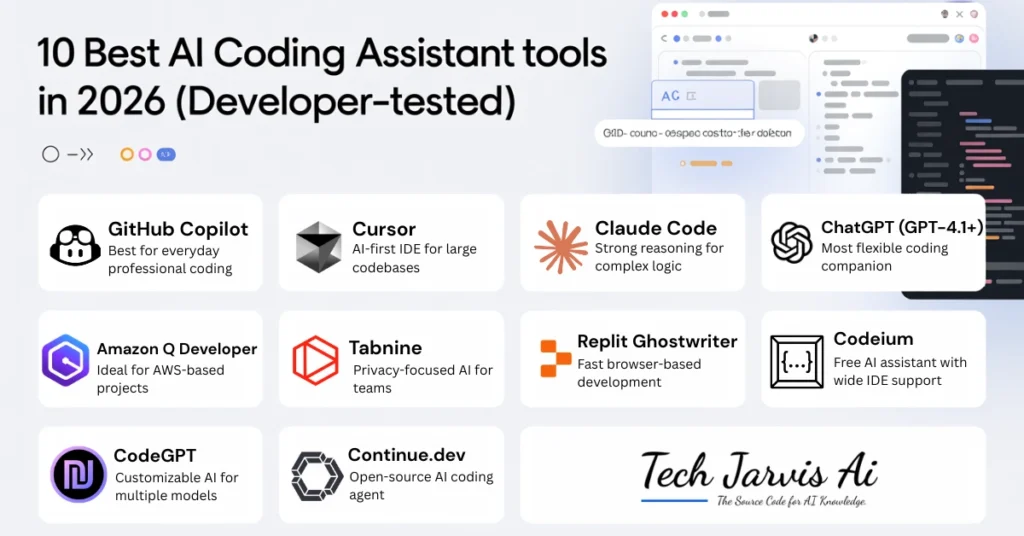
| Tool | Best For | Pricing Model |
|---|---|---|
| GitHub Copilot | Daily professional coding | Paid |
| Cursor | Large codebases | Paid |
| Claude Code | Complex reasoning | Paid |
| ChatGPT | Flexible coding tasks | Free + Paid |
| Amazon Q | AWS projects | Paid |
| Tabnine | Privacy-focused teams | Paid |
| Replit Ghostwriter | Browser-based dev | Paid |
| Codeium | Free AI coding | Free |
| CodeGPT | Multi-model workflows | Paid |
| Continue.dev | Open-source control | Free |
This snapshot alone shows why 10 best AI coding assistant tools in 2026 isn’t a one-size-fits-all decision.
Top 10 AI Coding Assistant Tools Developers Trust in 2026
GitHub Copilot – Best for Everyday Professional Coding
GitHub Copilot remains a favorite for professional developers who want seamless AI-powered code completion. It integrates deeply with GitHub workflows and provides real-time suggestions based on code context. For teams focused on faster code delivery and reduced debugging time, Copilot feels like a natural extension of your IDE.
Cursor – AI-First IDE for Large Codebases
Cursor stands out as an AI-native IDE built specifically for large codebases. It excels at repo-wide search, advanced reasoning, and multi-step problem solving. If you manage complex applications, Cursor’s ability to understand project-wide context is a game-changer.
Claude Code – Strongest Reasoning for Complex Logic
Claude Code is known for its calm, logical approach to AI-assisted programming. It’s especially useful when dealing with intricate algorithms or long reasoning chains. Developers comparing advanced reasoning tools often explore Claude alternatives to see how it stacks up.
ChatGPT (GPT-4.1+) – Most Flexible Coding Companion
ChatGPT has evolved into one of the most flexible coding companions available. It can explain code, generate examples, refactor logic, and even help with architecture decisions. If you’re comparing AI models for coding, this ChatGPT vs Perplexity breakdown offers helpful context on model strengths.
Amazon Q Developer – Ideal for AWS-Based Projects
Amazon Q Developer is purpose-built for cloud-native development on AWS. It understands AWS services deeply and helps with secure, production-ready code. For teams heavily invested in Amazon’s ecosystem, this tool feels tailor-made.
Tabnine – Privacy-Focused AI for Teams
Tabnine focuses on enterprise-ready security and privacy-first AI. It supports on-premise deployment and local processing, which makes it attractive for companies handling sensitive code. If data privacy is non-negotiable, Tabnine deserves serious consideration.
Replit Ghostwriter – Fast Browser-Based Development
Replit Ghostwriter shines in rapid prototyping and browser-based IDE workflows. It’s beginner-friendly and perfect for quick experiments or teaching environments. You don’t need heavy setup to get value from it.
Codeium – Free AI Assistant with Wide IDE Support
Codeium proves that free tools can still be powerful. It offers fast autocomplete, multi-language support, and wide IDE compatibility. For solo developers or students, Codeium is often the first step into AI-assisted coding.
CodeGPT – Customizable AI for Multiple Models
CodeGPT allows developers to choose and switch between different AI models. This flexibility is ideal for teams experimenting with multi-model support or custom AI agents. It’s especially useful for API-based coding workflows.
Continue.dev – Open-Source AI Coding Agent
Continue.dev is an open-source AI assistant designed for full transparency and customization. It supports local LLMs and gives developers complete control over how AI interacts with their code. Open-source contributors often prefer this level of freedom.
Best AI Coding Assistant by Use Case (Quick Recommendations)
Not every developer needs the same tool. Beginners often prefer simple interfaces and free plans, while enterprises focus on compliance and scalability. Startups usually want speed, whereas freelancers prioritize flexibility.
If you’re comparing reasoning-heavy assistants, exploring Claude alternatives can help narrow your options. The key is matching the tool to your workflow rather than chasing features you won’t use.
Key Features to Look for in an AI Coding Assistant in 2026
Security, accuracy, and speed should be at the top of your checklist. A good AI assistant must handle real-time code completion without slowing down your IDE. IDE support and pricing flexibility also matter more than flashy features.
Look for tools that offer intelligent suggestions, inline documentation, and AI-powered debugging. These features directly improve developer efficiency and reduce context switching.
AI Coding Assistants vs Human Developers – What’s the Real Role?
AI isn’t replacing developers—it’s reshaping their role. Think of AI as an amplifier for human judgment, not a substitute. Developers still make architectural decisions, review code, and ensure accountability.
In fact, many teams use AI alongside AI performance tools to measure productivity and code quality. The future of software engineering is human-in-the-loop, not human-out-of-the-loop.
Pricing Breakdown – Free vs Paid AI Coding Tools
Free tools like Codeium and open-source options like Continue.dev are great starting points. Paid tools, however, often provide better accuracy, enterprise support, and advanced features.
When evaluating pricing, consider hidden costs such as usage limits or team licensing. The most cost-effective option isn’t always the cheapest—it’s the one that saves you the most time.
How to Choose the Right AI Coding Assistant for Your Tech Stack
Start by assessing your tech stack and team size. SaaS teams may prioritize scalability, while solo developers value simplicity. Language support and framework compatibility also play a big role.
The 10 best AI coding assistant tools in 2026 cover a wide range of needs, so choosing wisely means aligning features with real-world workflows, not marketing claims.
Frequently Asked Questions About AI Coding Assistants
Which AI coding assistant is best in 2026?
There’s no single winner. GitHub Copilot excels for daily coding, while Cursor and Claude shine for complex projects.
Are AI coding tools safe for private repositories?
Many tools now offer enterprise-grade security, including on-premise deployment and privacy-first models.
Can AI assistants write production-ready code?
They can generate high-quality code, but human review is still essential for reliability and accountability.
Do AI coding tools support multiple programming languages?
Yes, most modern tools support popular languages like Python, JavaScript, Java, and more.
Will AI replace software developers in the future?
No. AI enhances developers rather than replacing them, acting as a powerful assistant instead of a decision-maker.
Conclusion
Choosing among the 10 best AI coding assistant tools in 2026 isn’t about following hype—it’s about finding what genuinely improves your workflow. Whether you’re a beginner, freelancer, or enterprise engineer, the right AI assistant can help you write better code, faster, with less stress.
Used wisely, AI becomes your most reliable coding partner—not your replacement.