

Quick Answer
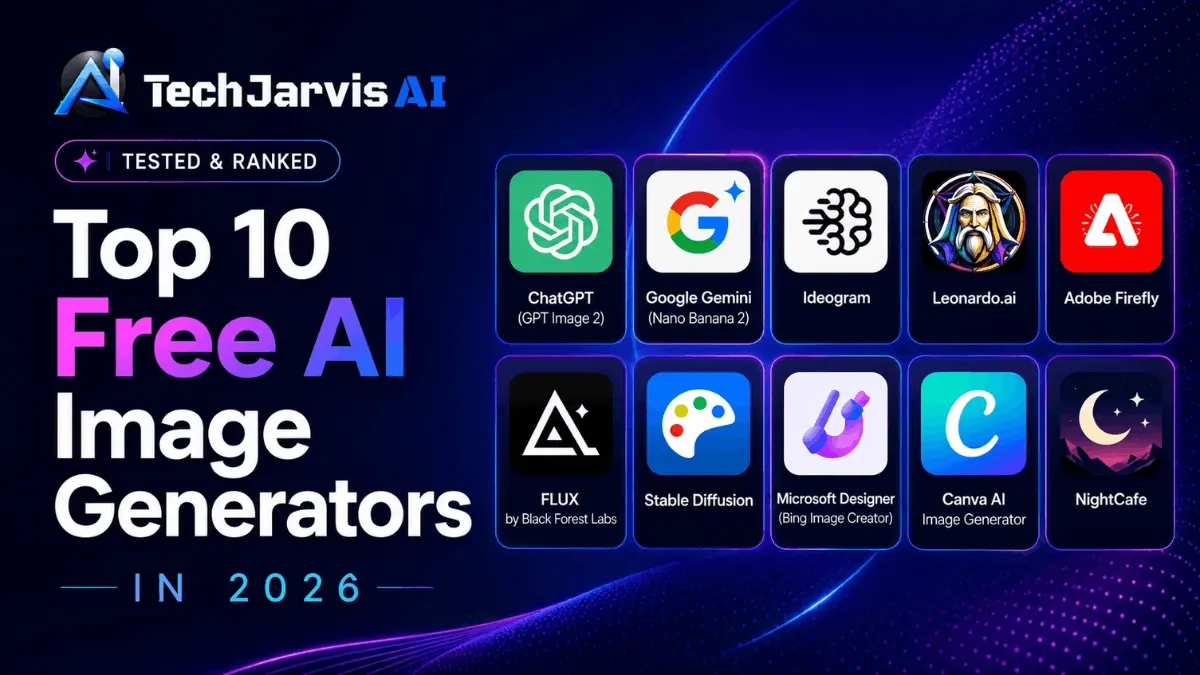
The best free AI image generator in 2026 is ChatGPT (GPT Image 2) for overall quality, especially photorealistic human portraits. Other picks worth trying include Google Gemini (Nano Banana 2), Ideogram, Leonardo.ai, Adobe Firefly, FLUX by Black Forest Labs, Stable Diffusion, Microsoft Designer, Canva AI, and NightCafe, each with a free tier suited to a different type of creator.
It is one of the most common questions people ask about AI image generators right now. And the answer depends on what you are actually trying to create, because some tools nail photorealistic portraits while others are only useful if you need text inside your images or want to run everything locally without daily caps.
This guide covers the top 10 free AI image tools available in 2026, tested side by side so you can pick the right one without wasting time.
How We Evaluated These Tools
Each tool on this list was tested personally across multiple sessions over several weeks. The evaluation covered prompt accuracy, free tier limits, image quality across different subject types (portraits, product shots, text overlays, and scene compositions), and real-world usability for a content website.
Where personal testing was limited (such as tools requiring local GPU setup), that is stated clearly. Community data from Reddit, Trustpilot, and independent reviewer publications was used to fill those gaps, and every external claim is attributed to its source.
Here is what was measured for each tool:
- Free tier quality — Does the free plan give you something actually usable?
- Daily limits — How many images can you realistically create?
- Image quality — Does it look professional or like a broken fever dream?
- Prompt accuracy — Does the AI understand what you actually asked for?
- Commercial use — Can you publish the images on your website or projects?
With that in mind, let’s get into it.
1. ChatGPT (GPT Image 2) — Best AI Image Generator in 2026

Based on my testing, ChatGPT is the best AI image generation tool available right now, and it has pulled further ahead of the competition in 2026.
OpenAI launched GPT Image 2 (model ID: gpt-image-2) on April 21, 2026, replacing GPT Image 1.5 as the default image model. The biggest upgrade is what OpenAI calls “thinking mode,” which plans the layout, checks references, and self-reviews before generating a single pixel. The result is images that feel intentional, not random.
Free tier: 2 to 3 images per 24-hour rolling window. The Plus plan at $20/month gives roughly 50 images per 3-hour window.
My Personal Experience
I use ChatGPT’s image generation more than any other tool on this list, and that is not a casual statement. I have tested most of these tools over multiple months, but ChatGPT is the one I keep coming back to for real work.
I create all the feature images for TechJarvis AI using ChatGPT. That includes the feature image for this very article, which I generated and edited directly through ChatGPT before publishing. When you are running a content website, you need images that look polished and professional, not AI-generated-looking stock photos that users immediately tune out. ChatGPT consistently delivers that.
The four-image generation per prompt is something I find useful in my workflow. You get four different interpretations of the same prompt at once, which means you are comparing options rather than regenerating from scratch. That alone saves a lot of time when you are producing feature images regularly.
When I generate a human face, there is no uncanny valley moment. No dead eyes. No melted fingers. The skin texture, lighting, and expressions come out natural enough that most people would not guess it was AI-generated on first look. That is not something every tool on this list can claim.
I have also tested it with product mockups and blog thumbnails. The prompt adherence is sharp. If I describe a specific mood, lighting setup, or color palette, it shows up in the output. Most other tools interpret prompts loosely and hope for the best. The text rendering is accurate too. If your image needs a readable headline, a sign, or a label, GPT Image 2 handles it noticeably better than earlier models.
Pros:
- Best output quality for realistic human portraits
- Accurate and reliable text rendering inside images
- Four image variations per prompt so you can compare before committing
- Conversational editing lets you describe changes in plain language without starting over
- Thinking mode handles complex layouts well
Cons:
- Free tier is limited to 2 to 3 images per day
- Thinking mode adds generation time, which is not ideal for quick batch work
- Transparent backgrounds are not yet supported across all endpoints
2. Google Gemini (Nano Banana 2) — Best When You Need More Daily Images

Google Gemini uses the Nano Banana 2 model (officially Gemini 3.1 Flash Image), released on February 26, 2026. I started using it regularly on days when I had already used up ChatGPT’s free limit before noon, and it surprised me.
I tested Gemini with the same prompts I use for TechJarvis AI feature images. It consistently picked up environmental details that I had almost given up expecting from free tools: the texture of wet pavement, soft backlighting on a subject, steam rising off a surface. The results were not always as natural as ChatGPT, but they were close enough for blog use without heavy editing.
Free users get approximately 20 images per day at up to 1K resolution, which is far more than most competitors offer, and that daily limit is the main reason it earns the second spot on this list.
That experience also lines up with what Reddit users in r/Google Gemini and r/artificial report: Gemini follows detailed prompts more closely than most free tools, but can feel slightly clinical in tone compared to ChatGPT’s outputs. Some users on those communities describe it as “robotic” or “corporate” (source: r/Google Gemini, aggregated via aitooldiscovery.com, June 2026). For image generation specifically, that distinction matters less than in chat, but it does show up occasionally in how compositions are framed.
Pros:
- Around 20 free images per day with no credit system to track
- Detail-focused prompt following, especially on environmental and lighting details
- Impressive text rendering in over 10 languages
- Built into the Gemini app with no extra tools needed
Cons:
- Nano Banana Pro is capped at around 2 images per day on the free tier
- Complex text overlays can still need a second attempt, so worth double-checking before publishing
3. Ideogram — Best for Text Inside Images
I ran a “Grand Opening Sale” banner prompt through both Leonardo and Firefly before trying Ideogram. Both mangled the kerning. Ideogram got it right on the first attempt: clean, readable, and spaced correctly. That is when I understood why it has such a specific reputation.
If your work regularly involves text inside images — signs, posters, logos, YouTube thumbnails with readable titles — Ideogram is the tool to start with. Everything else on this list is an afterthought for that use case.
That result matches what independent reviewers have consistently measured. According to a detailed review published by ToolJunction (May 2026), Ideogram’s text accuracy sits at 90 to 95 percent, compared to roughly 30 to 40 percent for most competing tools. Threads on r/graphic_design regularly recommend it specifically for thumbnails and merch mockups, which aligns with how I have seen it perform.
Where it falls short — and this is worth knowing before you rely on it — multi-person scenes often produce deformed faces and hand problems (source: pxz.ai Ideogram Review, 2026). Keep compositions simple if photorealism matters. On the support side, some users report inconsistent response times on billing disputes (source: Scribe Ideogram Review, April 2026), which is worth factoring in before committing to a paid plan.
Pros:
- Consistently accurate text rendering at 90 to 95 percent per independent testing
- Purpose-built for logos, posters, and typographic designs
- Fast generation with most images landing in under 10 seconds
- Paid plan starts at $7/month Basic and $16/month Plus
Cons:
- Not the best choice for photorealistic scenes or multi-person compositions
- Free tier images are public by default, so privacy requires a paid plan
- Free credits go quickly when iterating on a detailed design
4. Leonardo.ai — Best for Creative Volume Across Multiple Styles

I used Leonardo when I needed a batch of images across different visual styles in the same session: a mix of photorealistic product shots, concept art, and stylized social graphics. Switching between models inside one platform without logging into multiple tools saved real time.
The canvas editor and image-to-image features add flexibility that most free tools do not offer at this level. For creators working across varied content types, it is more versatile than anything else on this free tier list.
The community feedback is largely positive but with one specific complaint worth flagging. On Trustpilot, Leonardo holds a 4.0 out of 5 across 200 or more reviews, and Reddit users frequently describe it as the “underdog” they prefer over Midjourney specifically because it does not require Discord (source: cybernews.com Leonardo AI Review, June 2025). Customer support stands out: agents like Mark G., Fin, and Alyanna R. are named across dozens of reviews for resolving issues quickly and professionally (source: rainaiservices.com Leonardo AI Review, March 2026).
The consistent negative is content moderation. Multiple users report that legitimate creative prompts — female characters, elegant clothing, cinematic scenes — get rejected with no explanation. Leonardo acknowledged in platform replies that “automated content safety systems can sometimes feel overly strict” (source: rainaiservices.com, March 2026). If your creative work involves human figures or fashion, test the free tier thoroughly before subscribing.
Pros:
- Among the more generous daily token allowances on the free tier
- Multiple fine-tuned models covering photorealism, anime, concept art, and game assets
- Image-to-image and canvas editing included
- Customer support is consistently rated as outstanding across review platforms
Cons:
- Content filters can block legitimate prompts with zero explanation
- Output quality varies noticeably between models
- Character consistency can drift even when using the seed function
5. Adobe Firefly — Best for Commercial Safety
I tested Firefly specifically for a scenario where I needed images for a client-facing project, somewhere the licensing question actually mattered. The output quality for photorealistic work was behind ChatGPT and Gemini, but that was not the point. The point was knowing the images were legally clean, and Firefly is the only free tool on this list where that confidence is built in by design.
If you are already inside the Adobe ecosystem, the value is clearer. Generative Fill in Photoshop is where Firefly earns its place: select an area, describe what you want, and Photoshop fills it in with contextually appropriate content that matches the lighting and perspective of the surrounding image. Professional retouchers report that Generative Fill handles 60 to 70 percent of routine compositing tasks that previously required manual work (source: guptadeepak.com Top 5 AI Design Tools 2026, April 2026).
The community verdict is honest about the trade-off. Firefly’s image generation is good but not best-in-class for pure creative quality. Midjourney and DALL-E 3 produce more visually striking results for artistic use cases. Firefly’s real value is the commercial safety guarantee and the Photoshop integration, not raw generation quality. If you are evaluating it standalone, the free credits are limited and heavy users will run through them quickly (source: guptadeepak.com, April 2026).
Pros:
- Trained on licensed data, making it legally defensible for commercial and client work
- Generative Fill in Photoshop handles 60 to 70 percent of compositing tasks per professional user reports
- Supports text effects, vector recoloring, and generative fill
Cons:
- Not the strongest for raw artistic quality compared to dedicated tools
- Free credits run out quickly and the value increases significantly only if you are already on Creative Cloud
- Harder to justify as a standalone tool at its price point
6. FLUX by Black Forest Labs — Best for Open-Source Power Users

I ran FLUX through a hosted platform rather than locally, since I do not have the GPU setup for self-hosting. Even through a third-party interface with limited free credits, the difference in photorealistic detail was visible, particularly in hand poses and fine facial structure, two areas where most models still struggle regularly.
If you have a GPU with 12GB or more VRAM, running FLUX locally removes every daily limit and gives you full control. For non-technical users, it is accessible through platforms like NightCafe, Tensor.Art, and Civitai with some free credits to start.
The r/StableDiffusion community, which has over 500,000 members, has reached a clear verdict. One longtime moderator summed it up: “Flux won the quality battle. SD still wins on ecosystem, LoRA libraries, and community resources” (source: r/StableDiffusion via aitooldiscovery.com, February 2026). The recommended local setup in 2026 is ComfyUI for performance, with Automatic1111 as the starting point for beginners. Independent benchmarks rate FLUX.1.1 Pro as generating images in 4.5 seconds with the highest technical quality currently available in open-weight models (source: gradually.ai Best AI Image Models, May 2026).
Pros:
- Run locally with no usage caps if you have the hardware
- Stands out on pose consistency and hand detail in photorealistic outputs
- Actively maintained and trusted by the r/StableDiffusion community
- Multiple licensing options per model variant
Cons:
- Self-hosting requires technical setup and 12GB or more VRAM
- Hosted free tiers still have credit limits
- Interface quality varies depending on which third-party platform you use
7. Stable Diffusion — Best for Full Creative Control

I tried Stable Diffusion through a web-based interface rather than locally, which honestly undersells it. The out-of-the-box results from a hosted version are decent but not competitive with ChatGPT or Gemini. Where Stable Diffusion actually shines is when you go local: custom checkpoints, LoRA files, fine-tuned models for specific aesthetics. That requires setup, but the ceiling is higher than any cloud tool on this list.
Hugging Face hosts over 90,000 text-to-image models built on Stable Diffusion, including checkpoints and LoRA files covering anime, hyperrealism, oil painting, product photography, and beyond (source: bitsfrombytes.com Best AI Image Generator 2026, May 2026). That library is Stable Diffusion’s most underrated advantage and something no hosted service can replicate.
For non-technical users, OpenAI, Google, Microsoft, and Adobe now deliver stronger out-of-the-box results. Stable Diffusion still matters when local control, privacy, custom models, and repeatable pipelines matter more than convenience (source: diyai.io Best AI Image Generation Models 2026). That is an honest framing: it is not the tool for everyone, but for the right user, nothing else comes close.
Pros:
- Fully open-source with no cost when self-hosted
- Unlimited generation on your own hardware
- Over 90,000 community-built models available on Hugging Face
- Total privacy since prompts and images never leave your machine
Cons:
- Local setup requires 6 to 8GB VRAM minimum and 12 to 16GB for the best models
- Web-based free options have tightened their limits, so check current terms before relying on them
- Results feel inconsistent without solid prompting skills
8. Microsoft Designer (Bing Image Creator) — Lowest Barrier to Entry

I tested Microsoft Designer specifically to see how it holds up for someone with zero setup tolerance: no new accounts, no software, no credit cards. It worked. I was generating images in under two minutes using a Microsoft account I already had.
The output quality is not going to replace ChatGPT for anything important. But for quick placeholder images, blog graphics, or social posts where “good enough fast” is the actual goal, it delivers without friction. The 15 fast generations per day cover most casual use cases, and the slower unlimited tier is available after that.
MAI-Image-1, added in November 2025, ranks among the top performers on the LM Arena leaderboard, particularly for text rendering inside images (source: bitsfrombytes.com, May 2026). That is a genuine surprise given how the tool is usually positioned. The limitation that reviewers consistently flag is that the aesthetic tends toward a generic stock-photo look, practical for everyday use but less distinctive for anything premium (source: bitsfrombytes.com, May 2026).
Pros:
- Works in any browser with a Microsoft account and nothing to set up
- MAI-Image-1 ranks well on text rendering benchmarks
- Solid choice for quick mockups and casual content
Cons:
- Output aesthetic tends toward generic stock imagery
- The unlimited slower tier is frustrating when you are on a deadline
- Not competitive for premium or artistic creative work
9. Canva AI Image Generator — Best for Non-Designers

I use Canva for quick social media graphics on occasion, and the AI image generation is something I have tried a handful of times when I needed an image without switching to another tab. The quality is the weakest of anything on this list, but the workflow is the fastest: generate, drag into your design, done.
For someone whose primary job is not design and who already lives in Canva, that frictionless experience matters more than image quality benchmarks. The Brand Kit feature is underrated for this audience: it keeps colors, fonts, and logos consistent across AI-generated designs without extra effort.
A Statista 2025 survey found that 82 percent of marketing and design professionals say AI has improved their visual productivity, but 46 percent feel that AI-generated designs sometimes lack originality or creative depth (source: aivancity.ai AI Design Tools 2026, February 2026). Canva sits squarely in that trade-off: fast and accessible, but not where you go for distinctive or premium work. The community consensus matches: Canva AI is rated lower than dedicated tools on image quality but higher on workflow convenience for non-designers.
Pros:
- Images drop straight into your Canva design with no need to switch tools
- Brand Kit enforces visual consistency across AI-generated assets
- Simple enough for complete beginners to pick up immediately
Cons:
- Image quality is the weakest on this list for dedicated generation
- AI credits are shared across Canva’s broader plan limits
- Not the right choice if image quality is the primary requirement
10. NightCafe — Best for Exploring AI Art as a Hobby

I spent a few sessions on NightCafe when I was testing model variety. It gives you access to Stable Diffusion and FLUX variants through a single interface, which is useful for comparison. The community features are active and the daily challenge system keeps things interesting if you treat AI art as a creative hobby rather than a production tool.
For professional or regular content work, though, the experience showed its limits. The credit system is confusing in practice. I used up credits faster than expected because different models consume them at different rates, and that information is not surfaced clearly before you generate. The interface also feels older than most tools launched in the last two years.
That matches what reviewers have documented: the credit system is not intuitive, consumption rates are unclear, and the platform trades convenience for optimization. No single model it hosts is the best available version of that model (source: pickaxe.co Top AI Image Generators, March 2026). NightCafe has been building since 2019 and has over 25 million users, which gives it real credibility as a community platform. But for professional content creation at scale, Leonardo or dedicated FLUX platforms will serve you better (source: fahimai.com NightCafe Review, February 2026).
Pros:
- Active creative community with over 25 million users
- Multiple model options including FLUX and Stable Diffusion
- Credits available through daily participation and community activity
Cons:
- Credit system is confusing with consumption rates not clearly communicated
- Interface feels dated compared to newer platforms
- Credit expiry dates were added in 2026 so unused balances no longer carry over
- No single hosted model is the best available version of that model
Quick Comparison Table
| Tool | Free Tier | Best For | Community Rating |
|---|---|---|---|
| ChatGPT (GPT Image 2) | 2 to 3 images/day | Realistic portraits, overall quality | 5/5 |
| Google Gemini | ~20 images/day | Volume and accurate prompt following | 4.5/5 |
| Ideogram | ~10 prompts/day | Text-in-image designs | 4.7/5 (editorial) |
| Leonardo.ai | Daily tokens | Creative volume, multiple styles | 4.6/5 (Trustpilot) |
| Adobe Firefly | ~25 credits/month | Commercial and client work | 4/5 |
| FLUX | Unlimited (self-hosted) | Power users, pose accuracy | 5/5 (r/StableDiffusion) |
| Stable Diffusion | Unlimited (self-hosted) | Full creative control | 4/5 |
| Microsoft Designer | ~15 fast/day | Quick and casual use | 4/5 |
| Canva AI | Plan credits | Non-designers | 3.5/5 |
| NightCafe | 5 credits/day | Community and exploration | 3/5 |
Which One Should You Actually Use?
Here is the short version based on what you are trying to do:
- Best image quality overall — ChatGPT (GPT Image 2)
- Need realistic human faces — ChatGPT (GPT Image 2)
- Need more free images per day — Google Gemini (Nano Banana 2)
- Design has text inside the image — Ideogram
- Need high daily volume with style variety — Leonardo.ai
- Need commercial safety for client work — Adobe Firefly
- Want unlimited generation with your own GPU — FLUX or Stable Diffusion locally
- Already use Canva — Canva AI Image Generator
- Just want to explore AI art with a community — NightCafe
The biggest mistake people make is giving up after the first bad result. Most AI image tools need 2 to 3 prompt attempts to get something useful, and the gap between a vague prompt and a detailed one is bigger than the gap between most tools on this list. Describe the lighting, the mood, the visual style, the setting. Do not just type “a nice image of a person” and then blame the tool.
Final Thoughts
One thing the comparison table above cannot capture is that the right tool also depends on your patience and technical comfort level. ChatGPT is the easiest to get a great result from on the first try, but if you hit its free limit by noon, Gemini is the reliable backup. If you are comfortable running models locally, FLUX removes that ceiling entirely.
The mistake I see most often is people picking one tool and sticking to it even when it fails them. Rotate. Test the same prompt across two or three of these on your first day and you will know immediately which one fits how you work.
Most of them are free. There is nothing stopping you.