
Last Updated: January 2026
Introduction: What is Prome AI and Why It’s Revolutionizing AI Design?
If you’ve ever wished your rough sketches could instantly turn into polished, realistic visuals, Prome AI might feel like magic. It’s an AI-powered design tool built for architects, designers, and creators who want faster, smarter visual results without wrestling with complex software.
At its core, Prome AI combines AI image generation, sketch rendering, and design workflow automation into one streamlined platform. Instead of juggling multiple tools, you can sketch, render, edit, and even animate designs in a single dashboard. That’s why it’s quickly becoming popular among professionals exploring modern AI image tools and AI-driven design workflows.
Core Prome AI Features: Powering Your Creative Workflow
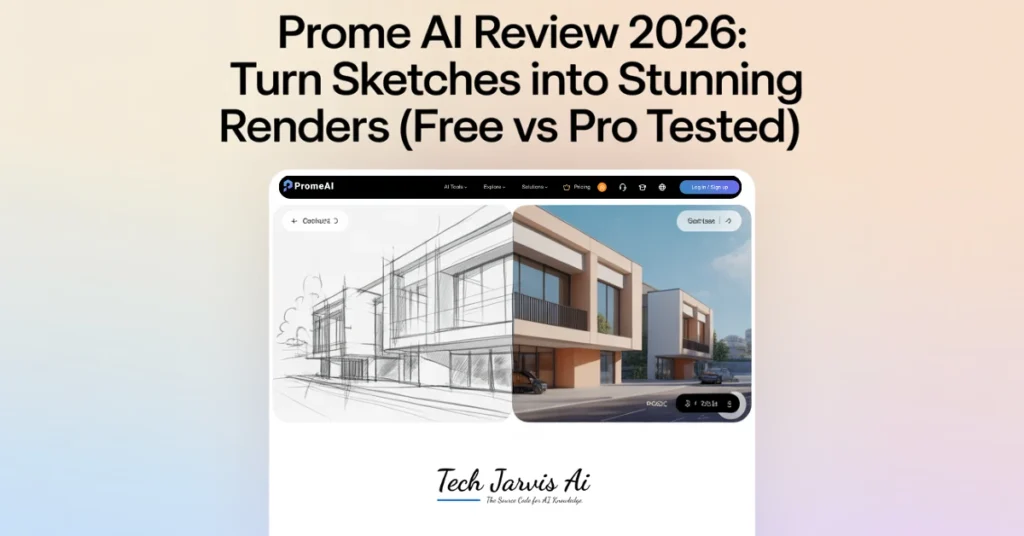
The Prome AI features list is extensive, but its true strength lies in “Sketch Rendering” and “Creative Fusion.” The sketch tool is remarkably intuitive, allowing you to upload a basic CAD export or a hand-drawn pencil sketch and watch it transform into a textured, lit environment. You can switch between thousands of styles—from “Cyberpunk” to “Minimalist Nordic”—with a single click, making it a highly versatile AI visual rendering assistant.
Another standout capability of the Prome AI rendering tool is its model switching. This lets you fine-tune the “creativity” level of the AI. If you need it to follow your lines exactly, you can set it to a strict geometry mode; if you want fresh ideas, you can let it “hallucinate” new architectural details. It’s this balance of precision and imagination that makes it such a potent AI image generator tools alternative for serious workflows.
Key AI Tools for Image Generation and Editing
Prome AI offers a modular dashboard where you can access specialized tools like the Background Remover, AI Supermodel (for e-commerce), and the Erase & Replace feature. These allow for advanced image generation and editing without needing to jump into Photoshop for every small tweak.
PromeAI Architecture: The Ultimate Rendering Tool for AEC Pros
For architects and AEC professionals, PromeAI architecture features are a major selling point. You can convert basic sketches, floor plans, or CAD exports into realistic interiors and exteriors using architecture rendering AI.
The real advantage lies in photo to render AI workflows. Upload a site photo or rough massing model, and Prome AI enhances it with textures, lighting, and depth. This approach speeds up client presentations and helps non-technical stakeholders visualize the final outcome more clearly.
Photo to Render AI and Advanced Rendering Workflows
Advanced rendering workflows in Prome AI focus on speed without sacrificing quality. You can fine-tune prompts, select material styles, and adjust perspective to match your design intent. The system learns from context, so results improve as you refine inputs.
This makes Prome AI features especially helpful for rapid prototyping. Instead of waiting hours for traditional rendering, you get usable visuals in minutes. For busy studios, that time savings can translate directly into better productivity and faster approvals.
Master Prome AI Video Generator for Dynamic Content
Static images are powerful, but motion often tells a better story. The Prome AI video generator allows AI video creation from images or text prompts, opening new possibilities for walkthroughs and presentations.
Architects can create short animated sequences to show spatial flow, while creators can produce social media clips quickly. When compared to other AI video tools, Prome AI’s advantage is how seamlessly it integrates video into the same design workflow.
Step-by-Step Image to Video Creation
Creating a video with Prome AI is straightforward. You start by selecting an image or rendered scene, then choose animation styles or camera movements. The AI handles transitions and visual consistency automatically.
This step-by-step process lowers the barrier for beginners. You don’t need video-editing experience to create engaging content, which makes the Prome AI platform appealing beyond traditional designers.
Prome AI Review: Real User Experience and Performance
In real-world testing, Prome AI delivers fast results with impressive visual quality. Render times are generally short, even on complex scenes, and style variety gives you room to experiment. However, fine-tuning small details can sometimes feel limited compared to advanced 3D software.
Overall, performance feels reliable for concept design and client previews. For a deeper breakdown, you can explore this detailed PromeAI review that focuses on hands-on experience and benchmarks.
Pros and Cons of Prome AI Software
- Pros: Incredible speed, high-quality AEC-specific models, and a generous free trial.
- Cons: High-resolution upscaling is limited to the Pro version, and the AI can occasionally miss subtle architectural details.
Is Prome AI Safe? Legitimacy, Security, and Trust
A common question is, “Is Prome AI safe?” Based on available information, the platform uses secure payment processing for the Prome AI Pro version and standard data protection practices. There’s no evidence of misuse or shady behavior.
For professionals, legitimacy matters. Prome AI appears to be a genuine, actively developed product rather than a short-lived experiment. That reliability builds trust, especially for commercial projects.
Prome AI Pricing: Free vs Pro Version Breakdown
Choosing between the free and paid versions depends on your volume. The Prome AI free version works on a “coin” system, giving you a handful of generations per month with watermarks.17 If you’re a professional, the Prome AI Pro version is almost a necessity for the HD upscaling and commercial usage rights.
| Plan | Monthly Coins | Key Features | Price |
| Free | 10 Coins | Basic rendering, public assets, watermarks | $0 |
| Base | 500 Coins | HD downloads, private assets, 4 concurrent jobs | $16/mo |
| Standard | 2,000 Coins | Video generation, commercial rights, 20 pending jobs | $29/mo |
| Pro | 6,000 Coins | Priority support, 80% discount on extra coins | $59/mo |
How to Use Prome AI App: Step-by-Step Guide for Best Results
Using the Prome AI app or web dashboard is designed to be frictionless. First, set up your account and head to the “Sketch Rendering” tab. The secret to getting the best AI image generation results is in the prompt—don’t just say “house.” Instead, try “modern glass villa at sunset with reflecting pool and forest background.”
Once you upload your sketch, use the “Control” slider to tell the AI how closely to follow your lines. If you’re happy with the layout but want better quality, use the HD Upscaler to sharpen the textures. It’s a loop of generating, editing with the “Erase & Replace” tool, and final upscaling.
Rendering a Sketch in PromeAI
Simply drop your image into the workspace, select your architectural style, and hit generate. You’ll get three variations to choose from in seconds.
Advanced Editing and Erase/Replace Features
If there’s a tree blocking your building or a piece of furniture you dislike, just brush over it and type what you want to see instead. The AI seamlessly blends the new object into the existing lighting.
Prome AI Alternatives: Top 3 Competitors Compared
While Prome is excellent, you might want to check out some Krea AI or other competitors depending on your specific needs.
- Vizcom: Best for industrial and product designers who need a “real-time” drawing experience.
- Dzine (formerly Midjourney alternative): Great for general creative work and high-end artistic blending.
- Rendair AI: A professional alternative focused strictly on architectural accuracy and BIM integration.
Final Verdict: Is Prome AI Worth It in 2026?
If you are an architect or creator who needs to produce high-quality visuals without the steep learning curve of V-Ray or Lumion, then Prome AI is absolutely worth it. It’s a powerful, fast, and secure tool that turns your “ugly” sketches into beautiful presentations. It saves time, simplifies the design workflow, and helps you communicate your vision more clearly.
Frequently Asked Questions
Is PromeAI free to use?
Yes, there’s a free plan with limited features and watermarked outputs.
What is Prome AI Pro version pricing?
Pricing varies by region, but Pro includes unlimited coins and commercial rights.
How does PromeAI architecture rendering work?
It uses AI to interpret sketches or photos and generate realistic architectural visuals.
Is Prome AI safe for professional use?
Based on current information, it appears secure and legitimate for professional projects.
What’s the best Prome AI video generator prompt?
Be specific about motion, camera angle, and style for smoother, more consistent videos.




Pingback: Remaker AI Review: Best Free Features You’ll Love
Pingback: Krea AI Review 2025: The Future of Creative Automation